
SEO Sorted plans, writes and publishes your blog for you
Imagine you run a small startup. You know people search for what you make, and you know you should be showing up. But every SEO tool you open is a wall of charts and words like SERP and CTR, and none of it tells you what to do on Monday.
Agencies charge $3–8k a month for about four blog posts. ChatGPT will write you a draft, but it won’t check what’s already ranking, link your pages together, publish anything or tell you if it worked. So most early-stage founders just don’t do SEO.
SEO Sorted is for them. You add your website, and it plans, writes, publishes and tracks your articles. It tracks them on Google and also in the answers people get from ChatGPT, Claude, Gemini and Perplexity.
Here’s a founder’s first week with it, roughly in the order things happen. Each step has its own section below, so click any of them to jump there.
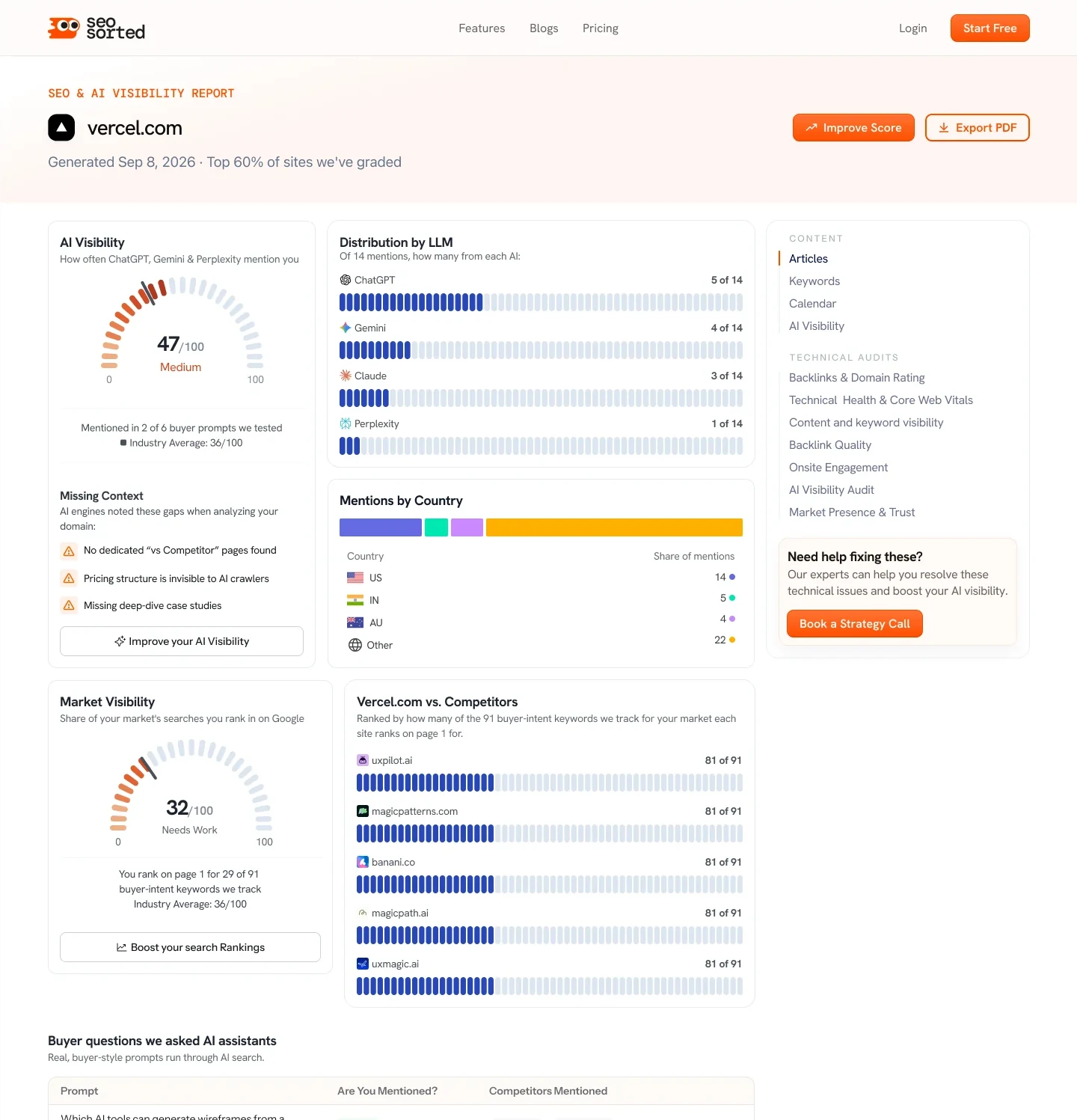 01Is my site even visible?A free report, before signing up
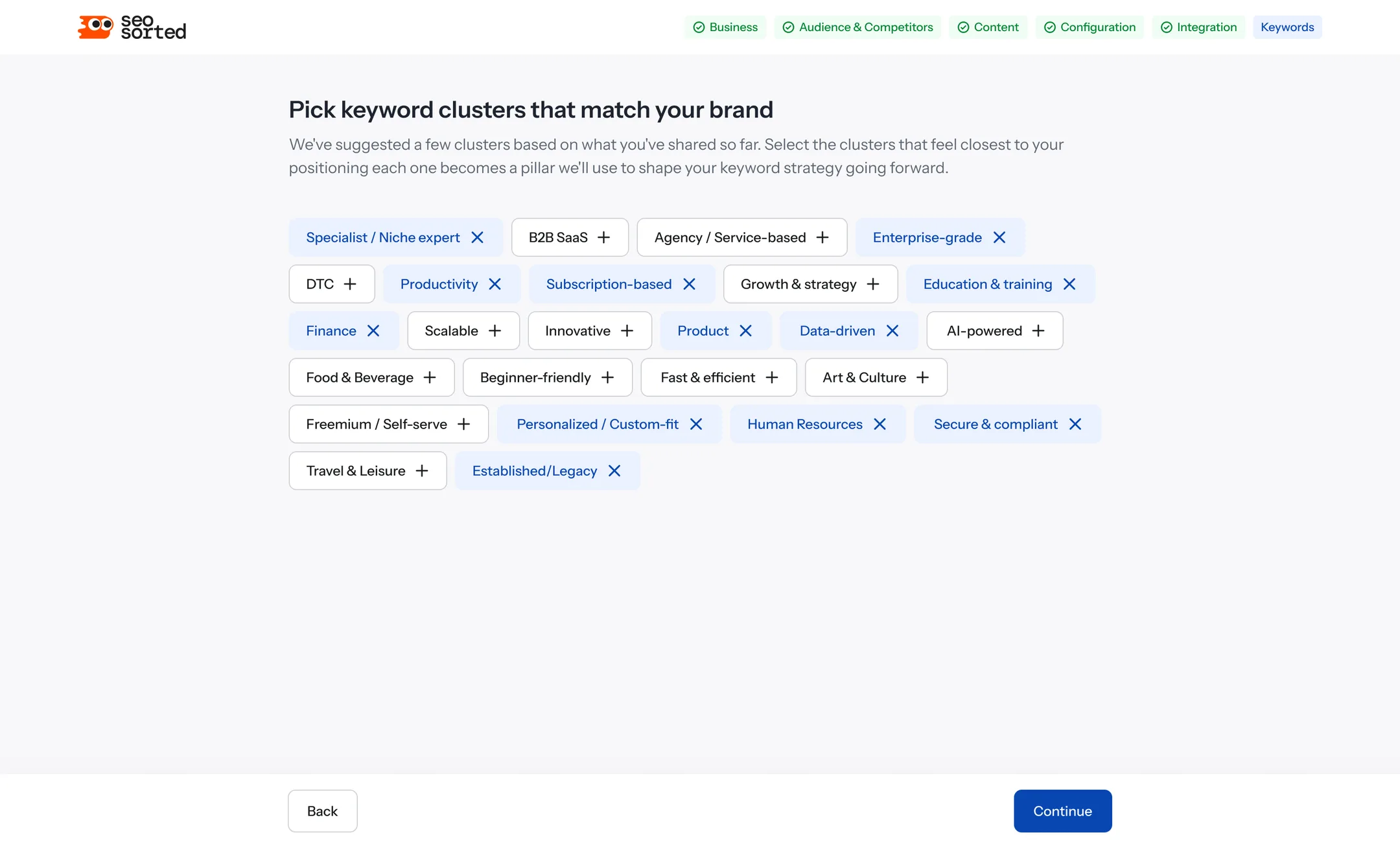 02How do I start?Onboarding in six steps
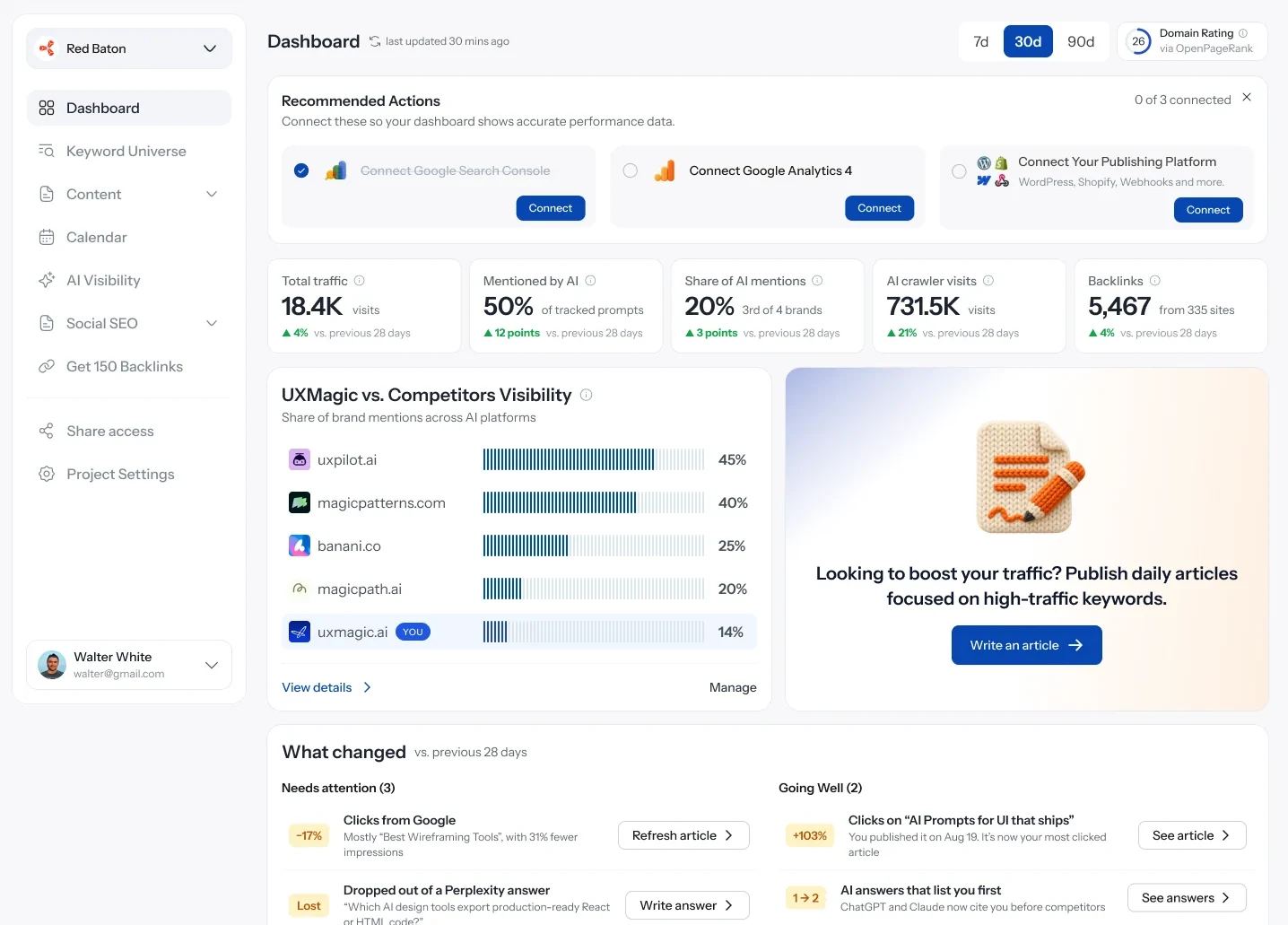 03What should I do today?A dashboard of next steps
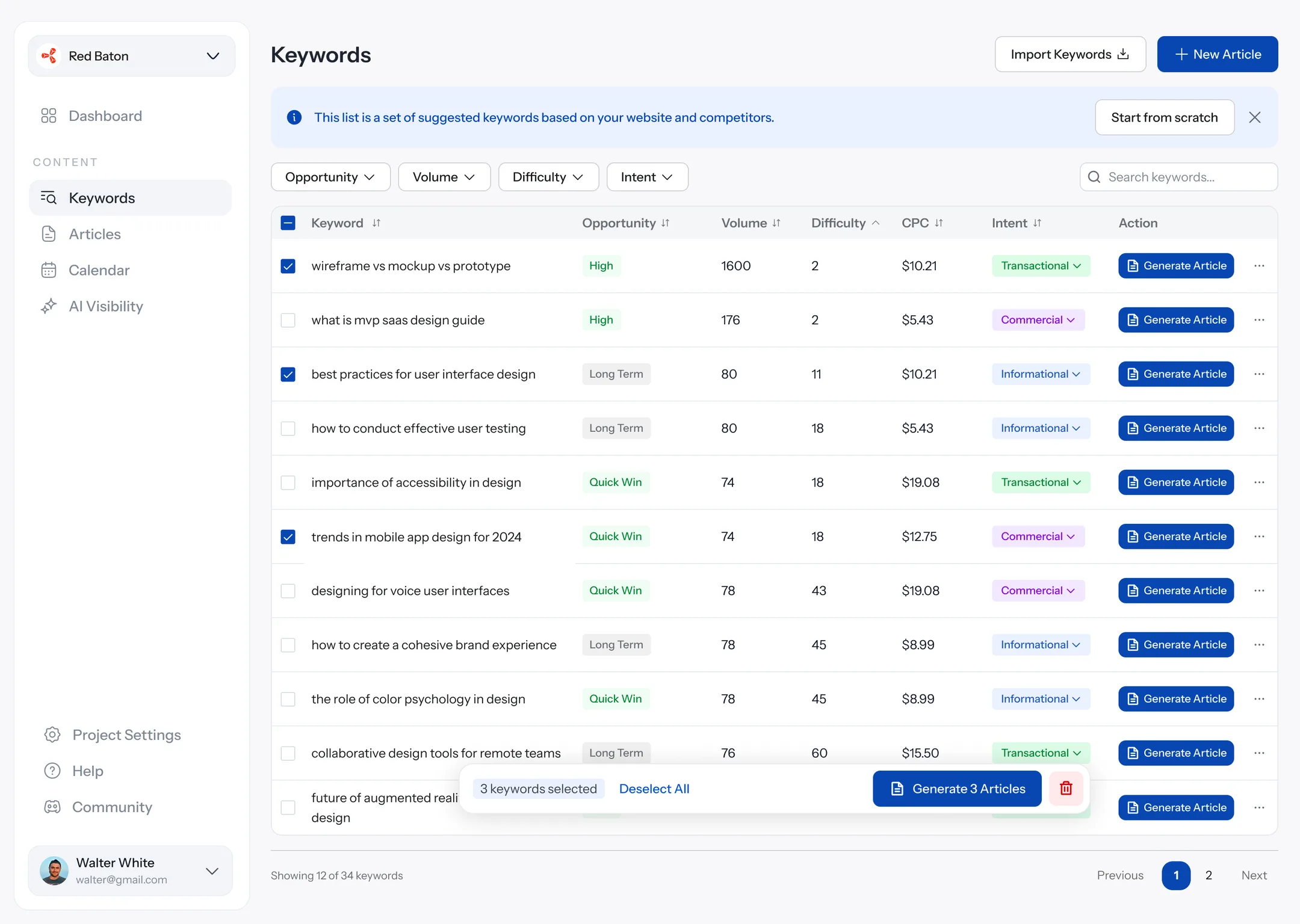 04What should I write?Keywords and the calendar
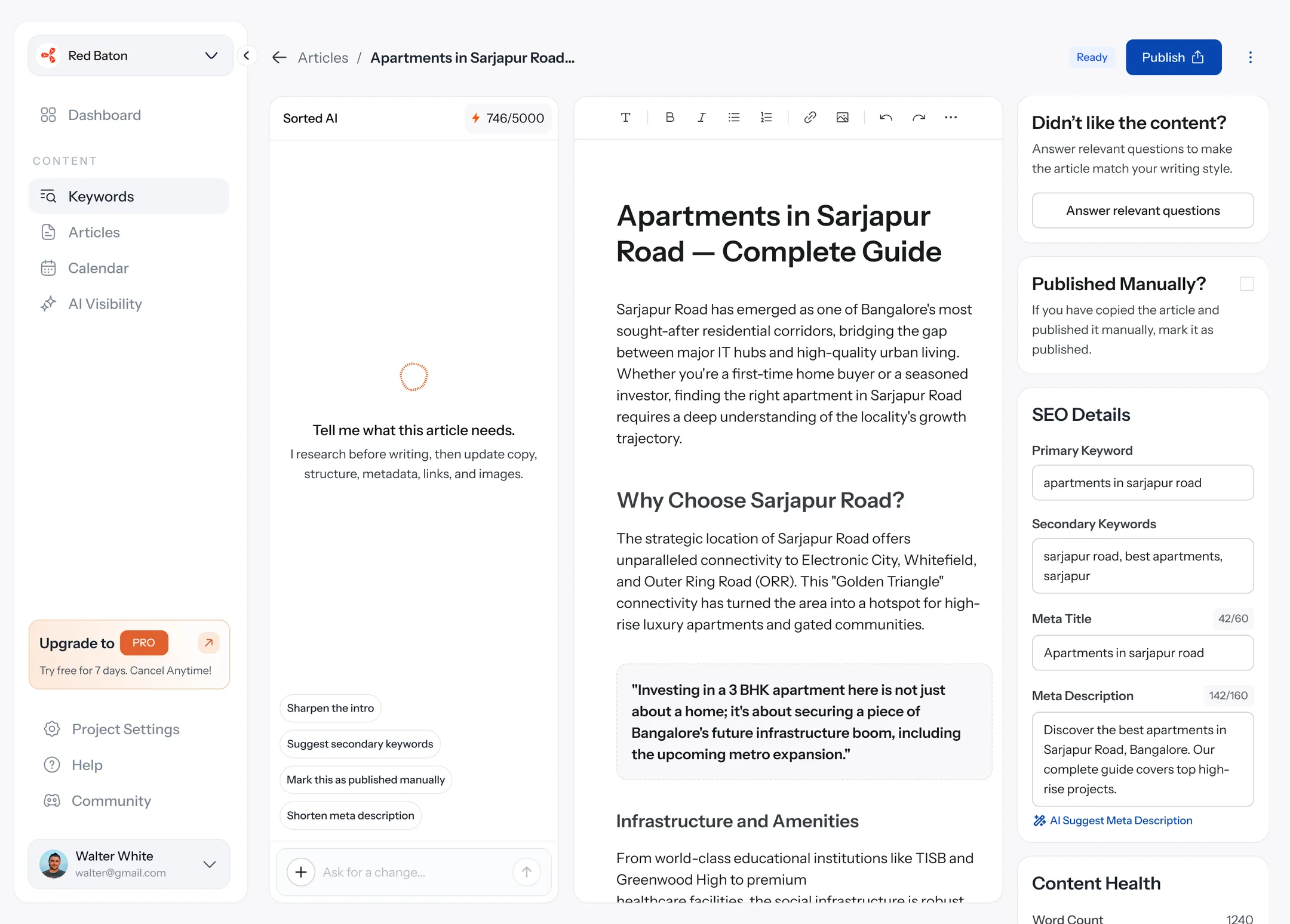 05Is this article good?An editor with the checklist built in
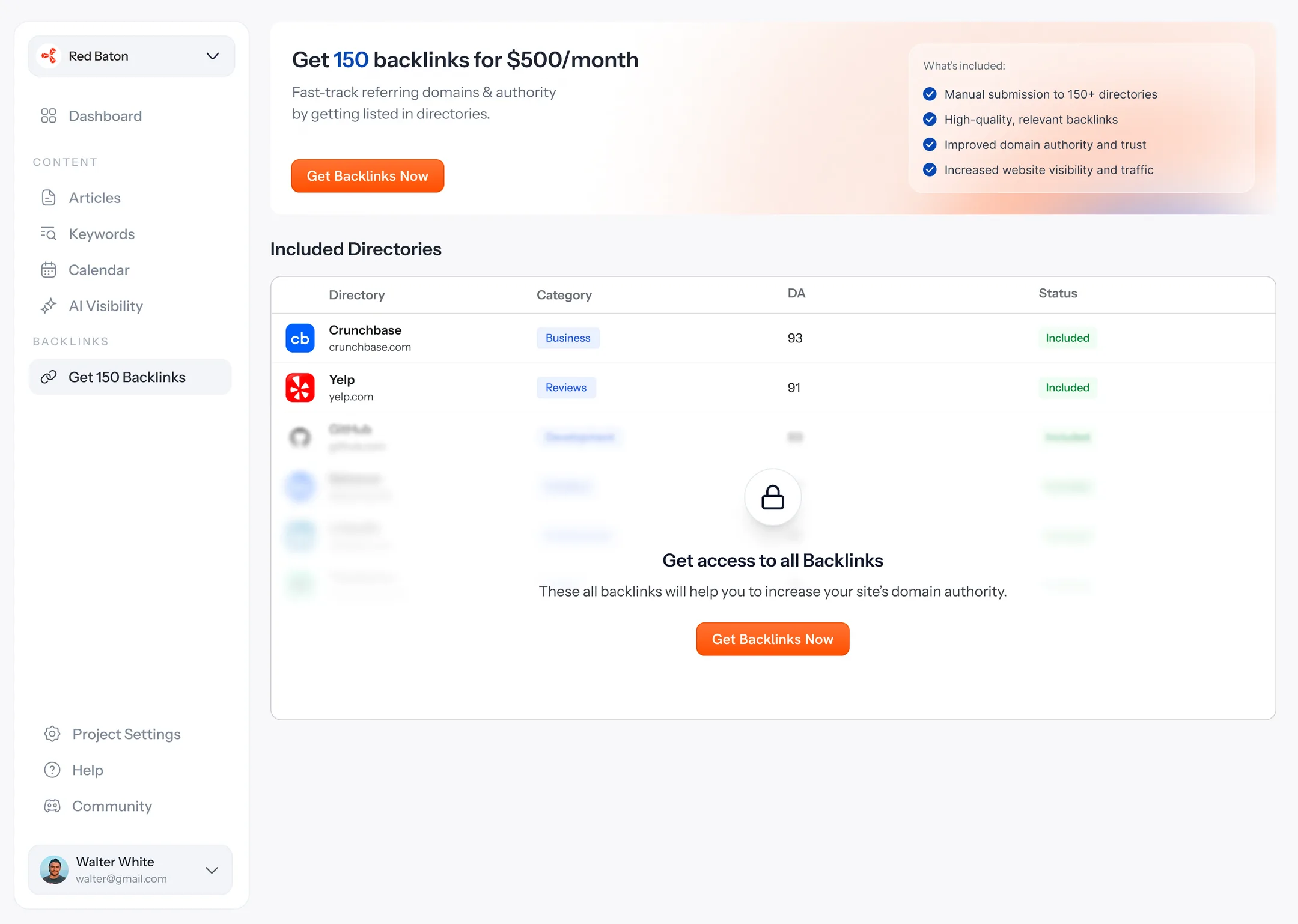 06What else can I do?Backlinks, YouTube and pricing
Founders aren’t SEO people, and the data didn’t help them
SEO Sorted does a lot: keyword research, a calendar, writing, internal links, publishing to 10+ website builders, Search Console tracking, AI visibility, backlinks and YouTube. And the people using it are founders, not SEO experts.
- Lots of data, not much meaning. “Impressions down 17%” is true, but it’s useless if you don’t know what to do about it.
- It’s empty on day one. A new site has no rankings and no traffic yet, and a grid of empty charts is the fastest way to lose someone.
- Too much jargon. Domain rating, SERP, CTR, intent. Every term is one more thing to learn.
So the question I kept asking on every screen was: how do I make SEO feel like a to-do list instead of a spreadsheet?
So every number had to come with a next step
Get founders who aren’t SEO people to publish every week, and keep coming back.
Founders don’t skip SEO because they don’t have data. They skip it because the data doesn’t tell them what to do on Monday. So if every number comes with its next step, and the tool does the boring parts for them, they’ll actually do something instead of just looking.
- Articles actually go live on customers’ sites, every month.
- Generating an article just works, so nobody gives up after a failed run.
- Teams keep generating articles month after month.
- New users write their first article quickly, not weeks later.
Is my site even visible?
Show people their real numbers before they sign up
A free report before you sign up
Paste any URL and get a real report before signing up: AI mentions, competitors, the buyer questions you’re missing and a few quick wins. Only the deeper actions, like a PDF export, ask for an email.
What I said no toAsking people to sign up before they see anything. I wanted them to see their own numbers first.
How do I start?
Let onboarding do the keyword research
Onboarding that does the research for you
01Who you sell to, and who you compete with.
02Tap the keyword topics that fit.
03Every connection has its own guide.
Six short steps, so SEO Sorted doesn’t have to guess. The last one suggests keyword topics that fit your business, and you just tap the ones that sound right.
What should I do today?
Tell people what to do today, not just how they’re doing
A dashboard that tells you what to do
01Five numbers up top, then what changed, each with the button that fixes it.
02Pick the competitors you want to be compared with. New ones show up after the next scan.
The top row shows the five numbers a founder cares about. Below it, What changed compares the last 28 days with the 28 before, and every change comes with the button that fixes it:
What I said no toAn earlier version of this dashboard, which was mostly a scorecard: lots of numbers, but you still had to work out what to do with them. The new one leads with what changed and what to do about it.
What should I write?
Turn a list of keywords into a month of posts
Turning keywords into a month of posts
Empty states tooKeywords come sorted by opportunity, and “Generate 3 Articles” turns your picks into drafts in one go. Then you drag them onto a calendar.
01An empty calendar, with one way forward.
02Drag unscheduled articles onto a day.
03Everything scheduled: all caught up.
Is this article good?
Check the SEO while people write
An editor that checks your SEO as you write
Sorted AI on the left, the article in the middle, the SEO checklist on the right. Ask AI rewrites any paragraph you select, and Publish sends it straight to your site.
01Ask AI on a selected paragraph.
02Answer a few questions so it sounds like you.
03Publish straight to your site.
What else can I do?
Let people see backlinks before they pay
Letting people see backlinks before they pay
01Before buying: a real preview and one button.
02After buying: progress you can watch.
03YouTube: a plan made from your channel.
Free users see the real list of backlink sites with the rest blurred, so they can picture what they’d pay for. After buying, the same page becomes a tracker.
What I said no toHiding the feature until you upgrade. People don’t buy something they can’t picture.
Pricing that shows the maths
A slider from 1 to 20 sites, with the total, the bulk discount and the saving each on their own line. After 20 sites, you talk to a person.
About 440 articles a month went live on their own
Numbers from PostHog, as of October 2026. We set it up at the end of July 2026.
Back to what I said I’d watch
Do articles actually go live?
434 scheduled articles were published in August and 448 in September, straight to customers’ sites.
Does generating just work?
In September, 223 of 224 articles generated without failing. From August to October overall, it’s 94%.
Do teams keep coming back?
From August to October 2026, between 21 and 45 teams generated articles each month, about 10 articles each on average.
Do new users start quickly?
Of the new users who wrote an article in their first week, 12 out of 15 did it on their very first day.
A number is only useful with something to do next to it
- Every number needs something to do next to it.When the people using a product aren’t experts, a chart without a next step is just decoration. If a section couldn’t end in a button, I asked whether it needed to be there at all.
- The empty state is the first impression.A brand-new site has no data, so I spent as much time on the empty dashboard, the empty calendar and “waiting for indexing” as on the full versions.
- Give the answer away first.The free report shows real numbers before asking for anything. We only ask for an email when it unlocks a specific next step.
Most people dropped off before they even finished setting up
I thoughtThe hard part would be getting people to write their first article.
Turned outThe hard part was getting them set up at all. 38 of 89 new sign-ups never finished setting up. The ones who did usually wrote on day one. So that’s the step I’m working on next.
I thoughtSEO meant ranking on Google.
Turned outA lot of people ask ChatGPT and Perplexity first now, so being mentioned in an answer matters as much as a link. That’s why AI visibility shows up on almost every screen.